New Integrated Weighbridge Software Now Available in WEEE Manager
Ready to Streamline Your WEEE Management?
See how WEEE Manager can help your business stay compliant and efficient.
Managing vehicles arriving and leaving a waste site often means switching between different systems, manually producing weighbridge tickets and then entering the same information again elsewhere.
WEEE Manager now makes that process much simpler.
Our latest integrated weighbridge software allows waste management and recycling businesses to create, manage and issue weighbridge tickets directly inside WEEE Manager.
From recording a vehicle arriving on site to calculating its net waste weight and producing a professional weighbridge receipt, the entire process can now be completed from one system.
There is no need to rely on separate weighbridge ticket software or disconnected spreadsheets just to record movements through your site.
Built Directly Into WEEE Manager
The weighbridge feature is fully integrated into WEEE Manager and sits alongside the rest of your waste management operation.
Users can see all weighbridge movements from a central dashboard, including key information such as:
- Weighbridge reference number
- Carrier or client
- Vehicle registration
- Arrival time
- Total weight
- Previous weighbridge entries
- Printable and downloadable tickets
The dashboard also provides an overview of today's weighbridge entries, today's recorded weight, monthly weight and total entries, giving operators a quick view of activity across the site.
Entries can be searched and filtered, making it much easier to locate historical weighbridge records when required.
Record Vehicles Arriving at Your Waste Site
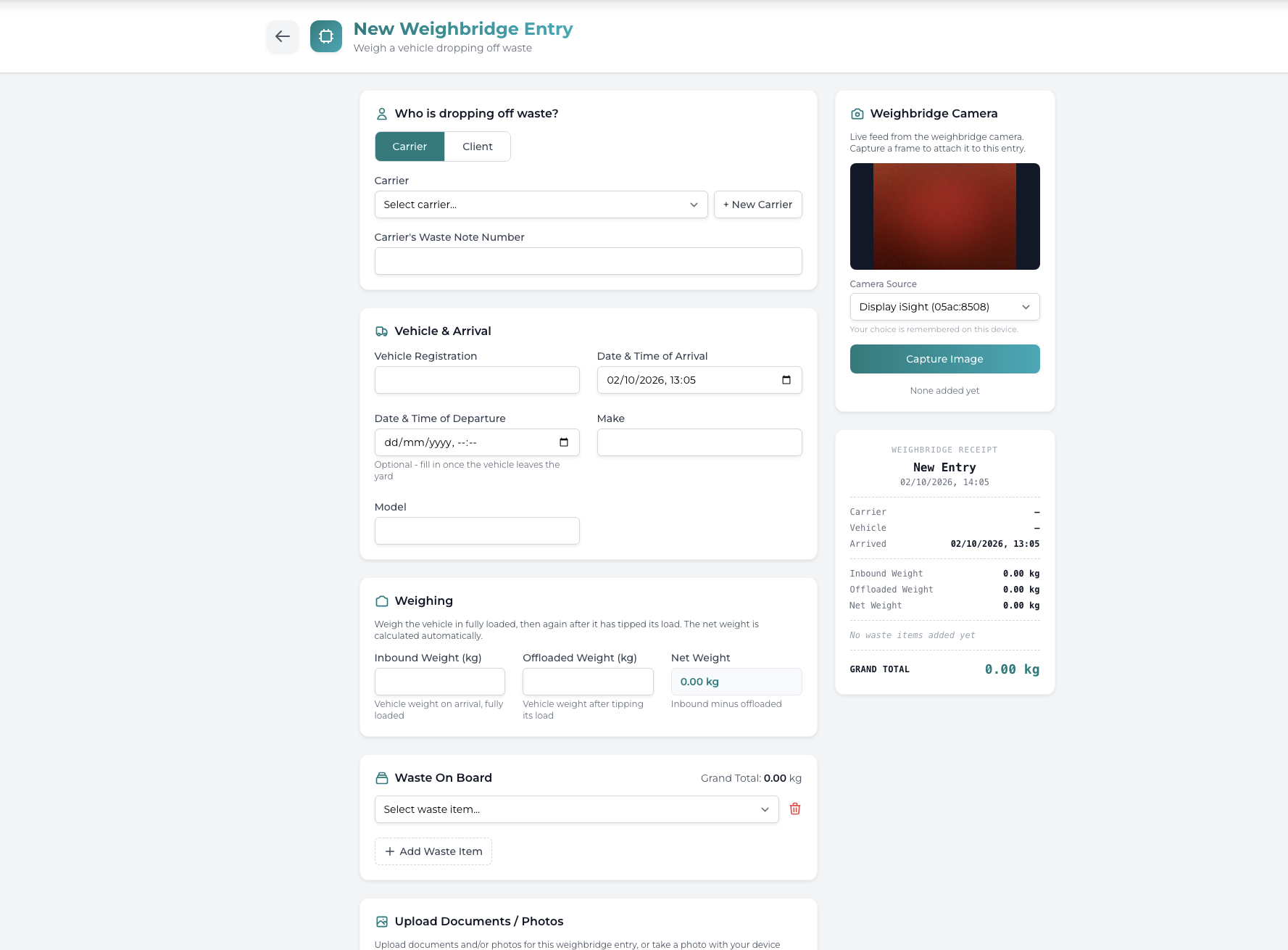
Creating a new weighbridge entry has been designed to be quick and straightforward for operators.
The system allows you to specify whether the waste is being delivered by a carrier or directly by a client, with the relevant company information linked to the weighbridge entry.
You can then record details including:
Vehicle registration
Record the registration of the vehicle entering the site.
Vehicle make and model
Additional vehicle information can be stored against the weighbridge movement.
Arrival date and time
Record exactly when the vehicle arrived.
Departure date and time
The departure time can be added once the vehicle has completed its visit.
Carrier waste note reference
Where applicable, the carrier's existing waste note number can also be recorded against the entry.
This creates a clear digital record of the vehicle movement without having to maintain a separate paper weighbridge log.
Automatic Net Weight Calculation
At the heart of the system is the weighing process.
When a vehicle arrives fully loaded, the operator can enter its inbound weight.
Once the waste has been unloaded, the vehicle can be weighed again and the offloaded weight recorded.
WEEE Manager then automatically calculates the net weight:
Inbound vehicle weight - offloaded vehicle weight = net waste weight
For example, if a vehicle arrives weighing 7,200kg and leaves weighing 5,500kg, the system records a net waste weight of 1,700kg.
This removes the need for operators to calculate the difference manually and helps reduce the possibility of simple data-entry or calculation errors.
Record the Waste Being Delivered
A weighbridge ticket is only part of the picture.
WEEE Manager also allows the actual waste being carried by the vehicle to be recorded against the weighbridge entry.
Waste types already configured within the system can be selected and associated with the transaction, including their relevant European Waste Catalogue (EWC) codes.
This means the weighbridge record can contain both the vehicle weight information and details of the waste received, keeping more of your site information together in one place.
Where several waste streams are present, additional waste items can also be added to the entry.
Built-In Weighbridge Camera Support
The integrated weighbridge system can also work with a camera connected to the computer being used at the weighbridge.
Operators can view the live camera feed and capture an image directly against the weighbridge entry.
This can provide an additional visual record of the vehicle, driver or load at the point the vehicle enters the site.
Rather than taking photographs separately and trying to match them with records later, the image can form part of the digital weighbridge entry itself.
Upload Supporting Documents and Photos
Additional documentation can also be attached to a weighbridge record.
Users can upload supporting files such as:
- Photographs
- Waste documentation
- Delivery paperwork
- PDF documents
- Word documents
- Other supporting site records
Photos can also be taken directly from a compatible device.
Keeping documents against the relevant weighbridge transaction makes it considerably easier to retrieve information if a customer has a query or records are required later.
Record Carrier Payments
Depending on the type of material being received, money may either be owed to the carrier or payable by the carrier.
WEEE Manager therefore includes payment options within the weighbridge entry.
Operators can identify whether:
We owe the carrier
or
The carrier owes us
This provides additional operational information against the transaction and helps businesses maintain a clearer record of what happened during the visit.
Create Professional Weighbridge Tickets Instantly
Once the entry has been completed, WEEE Manager automatically creates a professional weighbridge receipt.
The receipt can include information such as:
- Company details
- Unique weighbridge reference
- Carrier or client
- Vehicle registration
- Arrival date and time
- Departure date and time
- Staff member recording the entry
- Inbound weight
- Offloaded weight
- Net weight
- Waste description
- EWC code
- Total weight
The receipt can then be printed, downloaded as a PDF or emailed directly from WEEE Manager.
This makes it suitable for providing copies to drivers, customers, suppliers or internal departments without having to generate a separate document manually.
Every Weighbridge Entry Has Its Own Digital Record
Once saved, the complete weighbridge transaction remains available within WEEE Manager.
Staff can open the entry to review the vehicle movement, weights, waste information, uploaded documentation and associated photographs.
From the same screen they can also:
Print the entry
Produce a physical copy when required.
Download a PDF
Save a digital copy for your own records or send it externally.
Email the weighbridge ticket
Send the receipt directly from the system.
Edit the record
Update information where authorised.
This creates a much cleaner audit trail than relying on individual spreadsheets, paper tickets and separate document folders.
Why Use Integrated Waste Management and Weighbridge Software?
Many waste and recycling businesses have gradually built up several different pieces of software to manage their operation.
One system manages customers. Another manages waste transfer notes. Another produces weighbridge tickets. Documents sit in shared folders, while vehicle information may be recorded somewhere else entirely.
That can result in duplicate data entry and makes information harder to find.
WEEE Manager is designed to bring those processes together.
By incorporating weighbridge management directly into waste management software, operators can manage more of their daily workflow from a single platform.
The aim is simple: enter information once, keep it organised and make it easy for your team to access when they need it.
Designed for Waste and Recycling Businesses
The WEEE Manager weighbridge system can be useful for organisations operating:
- Waste transfer stations
- Recycling facilities
- WEEE recycling facilities
- Waste processing sites
- Scrap and material recovery operations
- Waste receiving sites
- Waste collection businesses
- Waste carriers operating their own yards
- AATFs and electrical recycling businesses
Whether you process a handful of vehicle movements each day or operate a busy waste receiving facility, keeping your weighbridge information digitally connected to the rest of your waste management operation can significantly simplify administration.
More Than Just Weighbridge Ticket Software
The weighbridge feature forms part of the wider WEEE Manager platform rather than operating as a standalone application.
WEEE Manager is designed to help UK waste businesses manage areas such as waste movements, digital waste records, collections, drivers, customers, vehicles and operational documentation through one central system.
With DEFRA Digital Waste Tracking functionality also forming part of the WEEE Manager platform, businesses can prepare their operation for an increasingly digital waste management environment without building their workflow around multiple disconnected systems.
The new weighbridge functionality adds another important part of that workflow directly into WEEE Manager.
Looking for Waste Management Weighbridge Software?
If your business currently uses separate software, spreadsheets or paper tickets to manage your weighbridge, WEEE Manager can help bring the process into one central platform.
You can record vehicles arriving at your site, calculate net waste weights, attach waste information, capture photographs and produce professional weighbridge tickets without leaving WEEE Manager.
Book a free demonstration today and see how WEEE Manager could work within your waste and recycling operation.
Transform Your Waste Management Today
Join hundreds of businesses using our platform to simplify WEEE compliance, reduce costs, and save time.
No credit card required • Free consultation • Quick setup
Frequently Asked Questions
Tags
Start Your Digital Waste Tracking Journey
Get started with professional waste management software. Request a demo or schedule a callback to learn more.